ICT has the potential to be used as a supportive educational tool enabling students’ learning by doing. ICT can make it possible for teachers to engage students in self-paced learning process. The Department of School Education has introduced ICT from upper primary to all standards. The National curriculum framework 2005 has also highlighted the importance of ICT in school education . ICT / computer EDUCATION notes and Current updates of Information communication technology or Digital world.
CLASS 6 CHAPTER 8 QUESTION ANSWERS
CLASS 6
CHAPTER 8 SOFTWARE APPLICATIONS ( GOOGLE EARTH)
QUESTION ANSWERS
Q1. What is Open Source Software?
Ans 1- Open source software is generally available free of cost on internet. We can edit source code of open source software.
Q 2- What is google Earth?
Ans 2- Google Earth is a computer program that gives a 3D representation of Earth based primarily on satellite imagery. It is used to find and view any location in computer.
Q 3- Who discovered Google Earth?
Ans 3- Google Earth is discovered by Keyhole Inc. Google purchased Google earth in 2004.
Q 4. What are various options available in Google Earth?
Ans 4 – Various Option are –
a) Look around
b) Move around
c) Slider
d) Search Box
e) Get Direction
f) History
g) Layers
h) Rulers
Q 5. What is software?
Ans 5 – The components of computer which we can not touch are known as software. Example – Mypaint , operating system , Games , MS word etc.
Q 6 – How to get directions or route between two places in Google earth/maps?
Ans 6 – Steps to get directions or route between two places in Google earth/maps are as below-
Q7 What is Geographic co-ordinate system?
ANS 7 -
Q8 How to find coordinates of any location in Google earth?
ANS 8 -
CLASS 6 CHAPTER 5 QUESTION ANSWERS
CLASS 6
CHAPTER 5
QUESTION ANSWERS
Q 1 – Name the tool used to create mind maps in computer?
Ans 1 – Tool used to create mind maps in computer is VUE installer . VUE means Visual Understanding Environment.
Q2 – What is mind map?
ANS 2-
Q3 – Write the use of various tools present on formatting palette of mindmap software.
ANS 3 -
Diagram of formatting palette is -
Uses of various tools are as below -
CLASS 7 CHAPTER 6 QUESTION - ANSWERS
CLASS 7
CHAPTER 6 SOFTWARE APPLICATIONS ( GEOGEBRA)
QUESTION ANSWSERS
Q 1 What is Open Source Software?
Ans 1- Open source software is generally available free of cost on internet. We can edit source code of open source software.
Q2. What is Geogebra ?
Ans 2- Geogebra is an open source and dynamic software.
It is used to make geometrical shapes in computer. It is available free of cost on internet.
Q3- Draw diagram of Geogebra Window.
Ans 3.-
Q4- Write the tools used to make a triangle and measure sum of its interior angle in Geogebra?
Ans 4- Tools of Geogebra used are-
a) Point tool
b) Line segment tool
c) Polygon tool
d) Angle tool
e) Input box
Q5 How to save Geogebra file?
Ans 5 – To save file in Geogebra , click on File and go to save option. Geogebra file will be saved with .gbb extension.
Q 6- Write name of tools of geogebra used to construct equilateral triangle using geometrical properties?
Ans 6- tools used are-
a) Line segment tool
b) Intersect tool
c) Circle with a center
d) Point tool.
Q7 -. What are tools of Geogebra used to construct a square using geometrical properties?
Ans 7- Tools used are-
a) Line Segment tool
b) Perpendicular tool
c) Intersect tool
d) Circle with a center
e) Point tool
Q 8- Name the tools-
Ans 8 - a) select Tool
b) Point tool
c) Line tool
d) Line Segment Tool
e) Angle tool
CLASS 7 CHAPTER 5 QUESTION - ANSWERS
CLASS 7
CHAPTER 5
QUESTION -ANSWERS
Q1 – Write steps to search any information on internet.
Ans 1 – Steps to search any information on internet are as below-
Step 1- Open any browser application like google chrome.
Step 2 – Type U.R.L (google.com) of search engine in address bar and press enter.
Step 3 – Now you will see homepage of Google. Type the keyword about which you want to find information like ‘planets’ in search box and press enter or click on search button.
Step 4 – Now page will show websites related to planets ; open any website which you like to open and find the required information.
Q2 - What is cyber crime? Write some examples of cyber crime.
Ans 2-
Q3- How to protect from cyber crime?
Ans 3-
Q4 – Where to compliant about any cyber crime ?
Ans 4 – Complaint about any cyber crime is to be done in cyber cell under the I.T ( Information Technology ) Act 2000.
Q5- what is intellectual property right?
Ans 5 -
Q6- what is copyright?
Ans 6 -
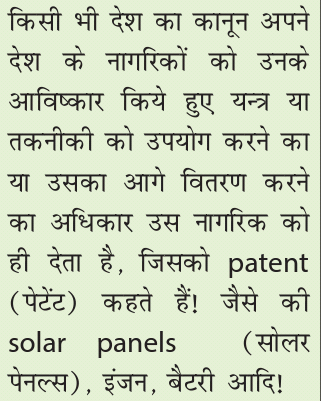
Q7 – what is patent?
Ans 7 -
Q8 – what is trademark?
Ans 8 -
Q9 - what is malware program?
Ans 9 -
Q10- what is computer virus?
Ans 10 -
Q11 – what is worm ?
Ans 11 -
Q12 – what is spyware and trojan horse?
Ans 12 -
Q13 – how can any malware program enter in our computer?
Ans 13 -
Subscribe to:
Posts (Atom)
Cyber Jaagrookta Diwas - In School
Cyber Jaagrookta Diwas
Popular post
-
CLASS 7 CH-4 GRAPHICS AND ANIMATION 02 Q.1 – What is Digital Art? Ans.1 - Digital art is art which is created using technology su...
-
-
CHAPTER 2 - DATA REPRESENTATION AND PROCESSING Q.1 What is word Processor? Ans. 1- Word Processor is a software whi...
-
CLASS 8 CHAPTER 2 SUMMARY AND EXCERCISE( MCQ, FILL IN THE BLANKS AND T/F)
-
CHAPTER 3 - AUDIO VISUAL COMMUNICATION Q/A Q1. What is digital Camera? Ans 1- Digital Camera is used to capture images. By using di...
Blog Archive
- August 2022 (2)
- April 2022 (1)
- March 2022 (6)
- February 2022 (3)
- January 2022 (3)
- December 2021 (35)
- November 2021 (4)
- October 2021 (5)
- September 2021 (3)
- April 2020 (1)
- January 2020 (15)
- December 2019 (5)
- November 2019 (4)
- October 2019 (3)
- August 2019 (10)
- July 2019 (7)
- June 2019 (3)