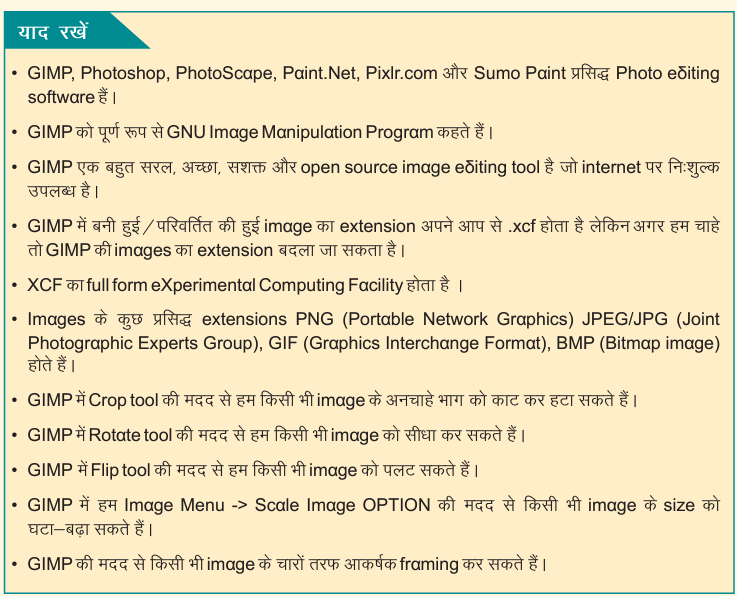
CLASS 8 CHAPTER 5 SUMMARY

CLASS 8 
CHAPTER 5 GRAPHICS AND ANIMATION

SUMMARY

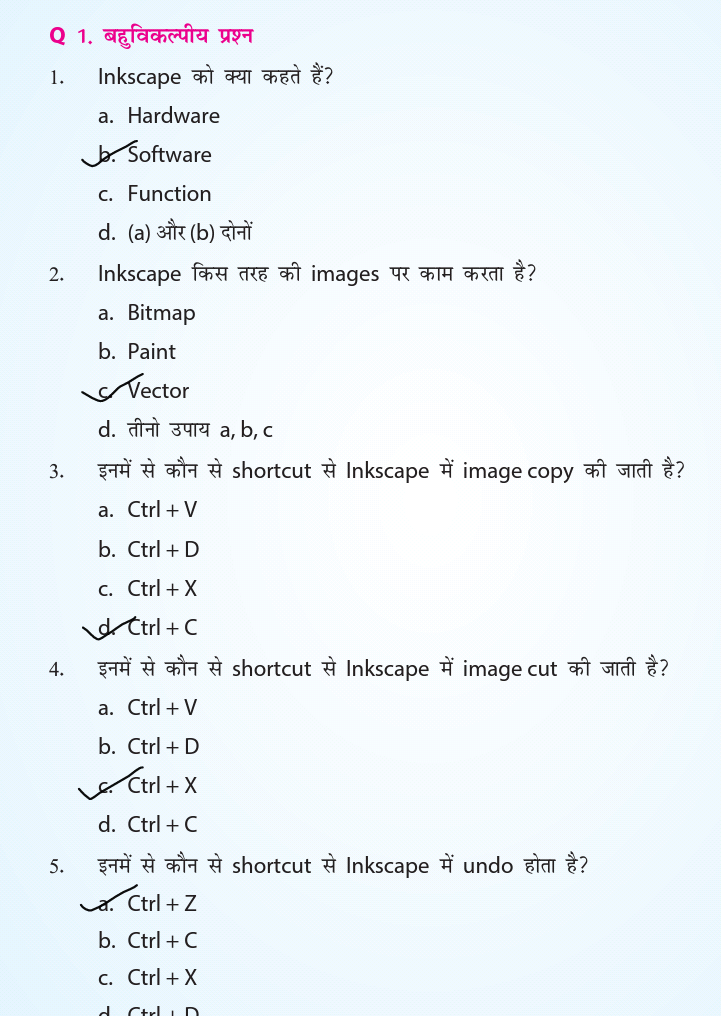
CLASS 8 CHAPTER 5 EXCERCISE ( MCQ, T/F , FILL IN THE BLANKS)

CLASS 8 

CHAPTER 5 GRAPHICS AND ANIMATION

EXCERCISE ( MCQ, T/F , FILL IN THE BLANKS)


I. CHOOSE THE CORRECT ANSWER (MCQ)


II. FILL IN THE BLANKS
 
 
III TRUE/FALSE


CLASS 6 CHAPTER 04 QUESTION ANSWER

 CLASS 6
 CHAPTER 04 – DATA REPRESENTATION AND PROCESSING 01
QUESTION ANSWERS

Q1. What is Data?
Ans.1 – Each object has attributes having some value which is known as Data. For Example Attribute “name” have value “raghav” , here raghav is data.

Q2. What are various types of data?
Ans. 2 – Various types of data are –
a) Numeric data
b) Text data
c) Date
d) Image
e) Audio
f) Video

Q3. What is spreadsheet?
Ans.3 – Spreadsheet is a computer application which helps to store data.

Q.4 Write examples of Spreadsheet?
Ans.4 – Examples of spreadsheets are – Microsoft Excel , Libra office , Calc , Google sheets etc.

Q.5 Write steps to open MS excel?
Ans 5- Steps to open MS excel are –
Step 1. Open search box for Apps by taking mouse on right side of screen or from start button.
Step 2. Type Excel in search box.
Step 3. Click on Ms excel or press enter from Keyboard.

Q.6 – What are various parts of worksheet in MS Excel?
Ans. 6 – Various Parts of Worksheet in MS Excel are –
a. Column
b. Row
c. Cell
d. Cell address
e. Formula bar

Q7. What is cell ?
Ans .7 – Cell is smallest box is MS Excel. Cell is made up of intersection of row and column.

Q8 – What is use of  fill handle ?
Ans 8 – Fill handle is used to copy formula from one cell to others.

Q9- Write some formulas used in MS Excel?
Ans 9 – Some formulas used are –
a. SUM() – used to calculate total.
b. MAX() – used to find maximum.
c. MIN() -  used to find minimum.


Class 8 Chapter 4 Question Answers

Class 8 
Chapter 4  Software Applications 04
QUESTION ANSWERS

Q.1 What is Stellarium software ?
Ans.1 – Stellarium is a free open source planetarium software. It is helpful in viewing 3-D view of sky on computer screen just like telescope or binoculars.
Stellarium is a software project that allows people to use their home computer as a virtual planetarium. It calculates the positions of the sun and moon , planets and stars and draws how the sky would look to an observer depending on their location and the time.

Q.2 How to install Stellarium software ?
Ans.2 – Stellarium software can be installed by downloading  it from website – http://www.stellarium.org. After downloading run the software and install it . After installing Stellarium icon will appear on desktop.
Stellarium software can also be installed in smartphones by downloading Stellarium Mobile Sky Map from Playstore.

Q.3 How to change date ,time and location in Stellarium software?

Ans .3 – Steps to change date, time and location in Stellarium are-
 Step 1. Take cursor on toolbar of Stellarium ( left side of window)
Step 2. Click on Location Window from Toolbar or press F6 Key.
Step 3. Now select your country and type the name of city in search box and select the city.
Step 4.  Now location will change, check the arrow mark on map shown for confirmation.
Step 5. Now to change date & time , open Date & Time Window from toolbar of Stellarium or Press F5 Key.
Step 6 . Set date and time as you want to set and software will show changes view according to time

Q. 4 How to check sun-rise and sun set in Stellarium software?

Ans 4 . Steps for sun-rise and sun set in Stellarium software are-
  Step 1 – open Stellarium , you will see “S” which means South direction.
 Step 2 – Change the orientation to East by clicking Shift+E
 Step 3- Chanhe location as delhi 
Step 4 –Change date and time and set date -01 september and time – 7:30 am
Now you will see sunrise .
Step 5 – for sun set change orientation to west direction by clicking Shift +W and set time of evening.

Q. 5 Write Steps  to search Moon with help of Stellarium software?
Ans 5 – Steps to search Moon are-
Step 1 – Open the toolbar from leftside of stellarium window.
Step 2 – Click on “Find Object Window” from the toolbar
Step 3 – Search Moon in the search box. After this moon will be displayed on screen. It will also display all the information regarding moon on left side of screen.

Q.6 What is Configuration window in stellarium?
Ans 6 – Configuration window is simple settings of program like language , information or to move around in stellarium window etc. To open configuration window click on configuration tool button from toolbar or press F2 key from keyboard.

Q.7 – Name the various tools present on the main bottom toolbar of Stellarium.
Ans 7 – Main Toolbar is present at bottom of Stellarium window. Various tools are –
a) Constellation
b) constellation names
c) Constellation art
d) Equitorial grid
e) Deep sky objects
f) View options


CLASS 6 CHAPTER 4 SUMMARY

CLASS 6
 CHAPTER 4
 SUMMARY

CLASS 6 CHAPTER 4 EXCERSIE ( MCQ , FILL IN THE BLANKS ,TRUE /FALSE)

CLASS 6 
CHAPTER 4 DATA REPRESENTATION AND PROCESSING
 EXCERSIE ( MCQ , FILL IN THE BLANKS ,TRUE /FALSE)
1. MULTIPLE CHOICE QUESTIONS (MCQ)


2. FILL IN THE BLANKS


3. TRUE/FALSE


CLASS 7 CHAPTER 4 QUESTION/ANSWERS

CLASS 7
CH-4 GRAPHICS AND ANIMATION 02

Q.1 – What is Digital Art?
Ans.1 -  Digital art is art which is created using technology such as mobile , computer. For Example Digital drawing is drawing on computer software instead of pencil and paper.

Q.2 – What is Inkscape?
Ans.2 – Inkscape is a computer software foe simple drawing and painting. It is available free of cost on internet. Inkscape is used to make vector images and edit images. For Example – shapes ( rectangle, square , circle , line) , logos , diagrams etc.

Q.3- What are two types of images?
Ans. 3 – Two types of images are – 
a) Bitmap images
b) Vector images

Q.4 – Write difference between bitmap image and Vector images.
Ans 4 – Bitmap images are the images we click using digital camera. They get blur while increasing the size of image.

Vector image are high quality image . They remains same as the original image while increasing or decreasing the size of image.

Q.5 – What are main parts of inkscape window /screen and draw windoe of inkscape ?
Ans 5 – Main parts of Inkscape window or screen are- 
  • a. Canvas
  • b. Page
  • c. Color palette
  • d. Rulers
  • e. Scrollbars
  • f. Toolbox
Diagram of inkscape window is -


Q. 6 – Write names of main tools present in Toolbox of Inkscape?
Ans . 6- Main Tools are-
a. Select tool
b. Zoom tool
c. Rectangle tool
d. Circle tool
e. Stars and Polygon tool
f. Pencil /Freehand tool
g. Eraser tool
h. Fill tool

Q.7 – Write use of Select tool of Inkscape?
Ans 7 -

Q.8 – Write use of Zoom tool of inkscape?
Ans 8- 

Q. 9- Write use of Rectangle tool of inkscape?
Ans 9 - 

Q.10- Write use of Circle tool of inkscape?
Ans 10- 

Q.11 - Write use of Stars and Polygon  tool of inkscape?
Ans.11 - 

Q.12 - Write use of Pencil/Freehand  tool of inkscape?
Ans 12- 

Q. 13 - Write use of Eraser tool of inkscape?
ans 13- 

Q.14- Write use of Fill tool of inkscape?
Ans 14 - 

Q.15 – Write tools used to edit image in inkscape. Also write shortcut keys for the tools.
Ans. 15 – Various tools used to edit images are –
a. Undo and Redo –  shortcut key for Undo is CTRL + Z and shortcut key for Redo is CTRL +Y
b. Copy , paste and Delete – Shortcut key for Copy is CTRL+C , Shortcut key for Paste is CTRL+V  , Shortcut key for Cut is CTRL+X
c. Duplicate tool - Shortcut key for Duplicate is CTRL+D
d. Delete Tool - Shortcut key for Delete is Delete key or Backspace key
e. Node Tool - Shortcut key for Node Tool is F2 key.

Q.16 – How to make multiple copies of an image in inkscape?
Ans 16 -  


Cyber Jaagrookta Diwas - In School

 Cyber Jaagrookta Diwas  

Popular post